
any news? update audio test
108 any news? update audio test
from https://www.raspberrypi.org/downloads/raspbian/ get
Raspbian Jessie
Full desktop image based on Debian Jessie
Version: February 2016
Release date: 2016-02-09
Kernel version: 4.1
Release notes:
2016-02-09:
* dtb that uses mmc sdcard driver (fixes problems experienced with certain SD cards)
2016-02-03:
* new version of Sonic Pi (2.9)
* new version of Scratch (15/1/16)
* new version of Node-Red (2.5)
* new version of Wolfram (10.3)
* optional experimental GL desktop driver (can be enabled using advanced options in command-line raspi-config)
* new version of Java (1.8.0_65)
* new version of WiringPi
* raspi-gpio included
* ping no longer requires sudo (except NOOBS installs)
* support for more USB audio devices in lxpanel
* bug fix for creation of new menus in Alacarte
* various changes to raspi-config and GUI to tidy up board support and fix bugs, and updated translations
* small tweaks to theme to support GL driver
i use the torrent version and see up to 1.35MB/s download rate, 17min.
format 8GB SD and burn unzipped image.
with /boot/cmdline.txt add at end of first line " ip=192.168.1.102" ( without the " ) helps for the headless connection.
++ ok, the automount of the USB stick works ( again )
pls find it under /media/pi/STICKNAME/
in desktop pls use
[mouse right click]
Desktop Preferences / Desktop Icons / (enable) show connected volumes on the desktop
menu line top right is a eject drive safely icon
__my default setup:
sudo apt-get update
sudo apt-get upgrade
sudo raspi-config expand file system / name RPI / timezone /
sudo apt-get install -y mc xrdp scrot lsb-release wcd samba samba-common-bin htop ethtool autocutsel
prior audio USB sound card play see here
now need to test my USB soundcard + headset if the desktop operation / selection is possible now.
but first must use the powered USB hub.
select the soundcard from desktop
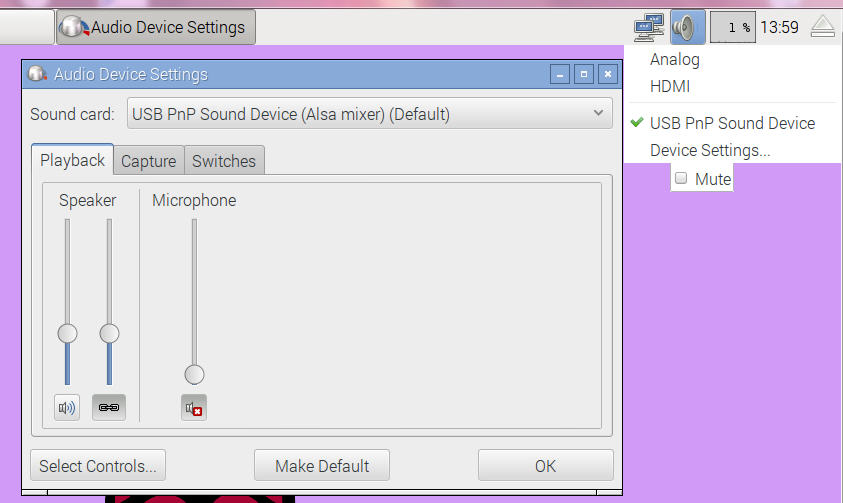
as usual i wanted to install audacity, but because of connection problems that did not work at first.
later try again, install audacity and test record and play: ok
save/export as a test.wav file under /home/pi/Music/
and try from terminal a simple aplay test.wav what says "playing" but not give sound.
from forum comes the info about a option for better audio
just read about an other linux variant able to run on RPI2
test and download
now just give the links here ( for me ) to check on it later.
update new raspbian jessie from here
2016-05-10:
* New version of Scratch, which no longer requires sudo
* New version of BlueJ
* New version of NodeRED
* New version of pypy
* pigpio included
* geany editor included
* SD Card Copier added (can be used to duplicate or back up the Pi)
* Bluetooth plugin added to taskbar
* Volume control on taskbar now compatible with Bluetooth devices
* New shutdown helper application
* Mouse double-click speed setting added to mouse and keyboard preference application
* Option to enable / disable 1-wire interface and remote access to pigpio added to Raspberry Pi config application
* File system automatically expanded on first boot
* Empty Wastebasket option added to right-click menu
* Ctrl-Alt-T can be used to open a terminal window
* Various small bug fixes and appearance tweaks
* Updated firmware and kernel (https://github.com/raspberrypi/firmware/commit/cc6d7bf8b4c03a2a660ff9fdf4083fc165620866)