
RPI_audio 2
98 RPI_audio 2
after forum post i want play again:
long time ago i installed a USB SOUND CARD ( 3$ ) see here on my RPI1 and today wanted to test it on RPI2 / new system.. and as usual i was not lucky.
-A- old info was :
well, that did not work anymore / i deleted again
i start searching internet but it is often difficult to find out what is more old info..
sudo nano /etc/modprobe.d/alsa-base.conf did not work
sudo nano /usr/share/alsa/alsa.conf did not work
UPDATE test with new JESSIE and /etc/asound.conf works again!
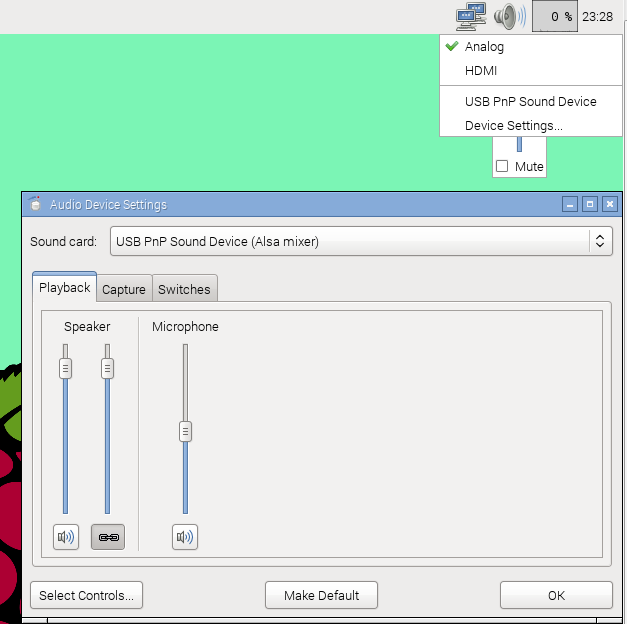
-B- in desktop is the audio module top right to adjust sound volume, where with
- right click select device i see the sound card, but i can not select it
only select between audio and HDMI
- right click select Device settings
i can select my sound card and set it default and say OK
but in header line no change
i even found out the program name and run it from terminal as sudo / no use
xfce4-mixer is the new bugger for audio like the dhcpcdui for network!
-C- so still can not record and play via my USBsound card
but i install
sudo apt-get install -y audacity
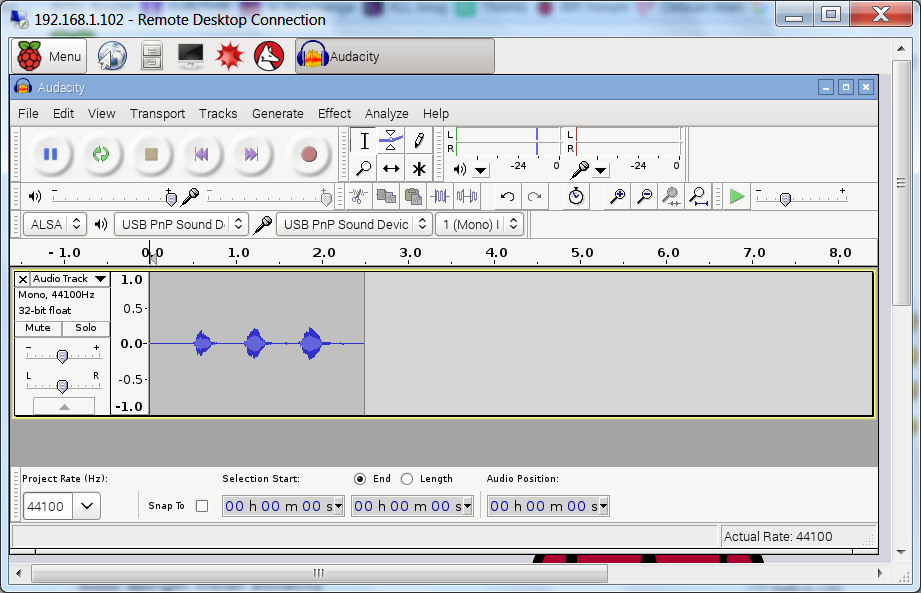
and there i can select my usb card for record and play separately! works
and now see this:
i have no idea since when that file is there? but i read here about it. more info here
i change this similar to the old info:
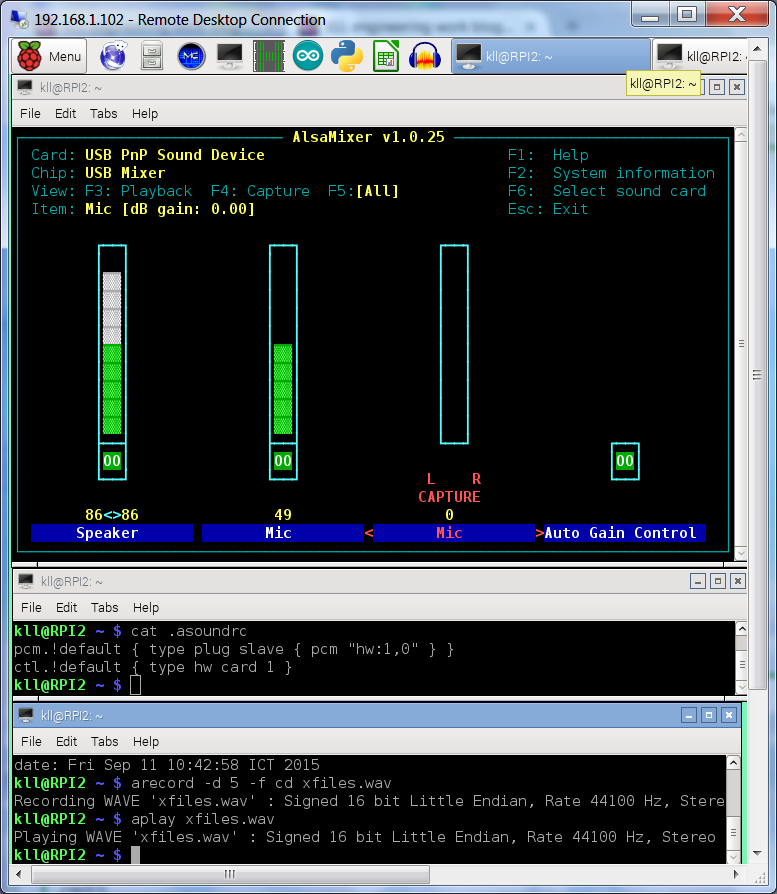
nano .asoundrc
pcm.!default { type plug slave { pcm "hw:1,0" } }
ctl.!default { type hw card 1 }
WORKS FOR MY 3$ USB SOUND CARD
test to record:
arecord -d 5 -f cd xfiles.wav
aplay xfiles.wav
what gives a 5 sec long file and i count loud ( after [enter] ) 1,2,3,4,5,6
and hear when i play 1,2,3,4,5 so there is no noticeable lag
still digging about using the xfce4-mixer
actually i not find that error why it not accept / remembers the default set of my card , only work arounds.. here
sudo nano /etc/modprobe.d/alsa-base.conf
#KLL options snd-usb-audio index=-2
options snd-usb-audio index=0
can not select card or device setting in desktop amixer, alsamixer not run
CHANGE BACK and even see desktop headerline not work anymore...
until i found that my .asoundrc is partially overwritten!
it would be very interesting to found out what program did that? HE DID IT AGAIN!
ok, when i try the desktop device setting sound card as default
the file changes
from:
cat .asoundrc
pcm.!default { type plug slave { pcm "hw:1,0" } }
ctl.!default { type hw card 1 }
to:
cat .asoundrc
pcm.!default { type hw
ctl.!default { type hw
pcm.!default {
type hw
card 0
}
ctl.!default {
type hw
card 0
}
cat .asoundrc
pcm.!default { type plug slave { pcm "hw:1,0" } }
ctl.!default { type hw card 1 }
to:
cat .asoundrc
pcm.!default { type hw
ctl.!default { type hw
pcm.!default {
type hw
card 0
}
ctl.!default {
type hw
card 0
}
and also aplay -l and alsamixer not work anymore
but i already have prepared: cp .asoundrc.usb .asoundrc OR cp .asoundrc.org .asoundrc
anyhow, if i use the mod of the selected USB sound card in .asoundrc,
i must stay away from the desktop volume / audio output / card select tool / xfce4-mixer
i could even erase it from the desktop menu, because for volume must use alsamixer,
i will not switch between audio and usb card, and as i only work headless ( but not remote )
never use HDMI.
but just found that forum info: here
-1- a reboots overwrites that file?
no, reboot putty check file and play, start xrdp and check again, no problem.
-2- /usr/share/alsa/alsa.conf
By commenting out the "~/.asoundrc" line it tells ALSA to ignore the file. ? for what ?
as expected, aplay not work anymore, alsamixer still see it but not as default CHANGE BACK
did some more digging and testing but not find a other way,
if the file .asoundrc is deleted it will be created at next boot (by what?)
if you modify the file and use the
desktop tool xcfe4-mixer and select USB sound card and try set to DEFAULT your .asoundrc is overwritten or even damaged up to a situation where the headerline (menu) not work anymore.
also the desktop volume control not work for the USB sound card.
only terminal: alsamixer, so you could just delete the xcfe4-mixer
from the desktop menu.
where to set the USB sound card to default so xcfe4-mixer see that too
i not find, CLI tools like xfconf-query -c xfce4-mixer -p /active-card -s '...' did also not work, but the idea is that the default card is set at xfconf and not at ( possibly by but not work ) xcfe4-mixer.
anyway i got the impression that xcfe4-mixer tool is a 'dead dog' as there is no active maintainer.
RPI forum search does not work so i not know where else is info:
Information: No posts were found because the word xcfe4-mixer is not contained in any post.
but search engine find: here
say that the DEFAULT of a card should work!
forum
many experts, no sound card issues reported.
i tested it on RPI1B and RPI2B / both systems up-to-date
using a USB powered HUB for the USB SOUND CARD
now i want test to run it on a RPI2 directly
-a- use a 0.7A LGA phone charger only
-b- use the USB sound card via a very thin looking USB ext. cable without powered USB HUB
and play a song.
The red power led on the RPI did not blink off,
the very bright red led on the USB sound card blinks while the play runs.
so i think i NOT need that special USB power setting for RPI2
edit: /boot/config.txt add line
max_usb_current=1
from the USB port norm 600mA increased to 1.2A for all four ports.
i not want to go forum with that until i verify,
win32diskimager burn 2015-05-05-raspbian-wheezy.img boot
sudo raspi-config sudo reboot
sudo apt-get update
sudo apt-get install xrdp ( i need desktop to play headless )
try about xcfe4-mixer / see usb card, can not select or make default
sudo apt-get upgrade
sudo reboot ( linux 4.1.6 )
same / so it was not about my old system settings..
see here and here is a better / and not too old info
what to change:
sudo cp /etc/modprobe.d/alsa-base.conf /etc/modprobe.d/alsa-base.conf.org
sudo nano /etc/modprobe.d/alsa-base.conf
options snd-usb-audio index=0
options snd_bcm2835 index=1 ( this i not tried until now )
so with deleted .asoundrc and reboot i test:
arecord -d 5 -f cd xfiles.wav
aplay xfiles.wav
works, and a .asoundrc still not exist, start desktop and here it is:
pi@RPI2 ~ $ cat .asoundrc
pcm.!default {
type hw
card 1
}
ctl.!default {
type hw
card 1
}
pi@RPI2 ~ $
the internal ALSA is default again and aplay not work
the operation selection and default setting via desktop still not work.
BACK to the manual .asoundrc but a new variant what not gets damaged when overwritten.
pi@RPI2 ~ $ aplay -l
**** List of PLAYBACK Hardware Devices ****
card 0: ALSA [bcm2835 ALSA], device 0: bcm2835 ALSA [bcm2835 ALSA]
Subdevices: 8/8
Subdevice #0: subdevice #0
Subdevice #1: subdevice #1
Subdevice #2: subdevice #2
Subdevice #3: subdevice #3
Subdevice #4: subdevice #4
Subdevice #5: subdevice #5
Subdevice #6: subdevice #6
Subdevice #7: subdevice #7
card 0: ALSA [bcm2835 ALSA], device 1: bcm2835 ALSA [bcm2835 IEC958/HDMI]
Subdevices: 1/1
Subdevice #0: subdevice #0
card 1: Device [USB PnP Sound Device], device 0: USB Audio [USB Audio]
Subdevices: 1/1
Subdevice #0: subdevice #0
pi@RPI2 ~ $
**** List of PLAYBACK Hardware Devices ****
card 0: ALSA [bcm2835 ALSA], device 0: bcm2835 ALSA [bcm2835 ALSA]
Subdevices: 8/8
Subdevice #0: subdevice #0
Subdevice #1: subdevice #1
Subdevice #2: subdevice #2
Subdevice #3: subdevice #3
Subdevice #4: subdevice #4
Subdevice #5: subdevice #5
Subdevice #6: subdevice #6
Subdevice #7: subdevice #7
card 0: ALSA [bcm2835 ALSA], device 1: bcm2835 ALSA [bcm2835 IEC958/HDMI]
Subdevices: 1/1
Subdevice #0: subdevice #0
card 1: Device [USB PnP Sound Device], device 0: USB Audio [USB Audio]
Subdevices: 1/1
Subdevice #0: subdevice #0
pi@RPI2 ~ $
update: try again with the RASPBIAN JESSIE
- there seems to be a difference between the JESSIE image and the wheezy->jessie update upgrade dist-upgrade! (2.5h )
update here