
chipKIT MAX32
27 chipKIT MAX32
THOMAS just send me today the
chipKIT Max32 from DIGILENT
actually he buy it from INEX for 65$.
I WANT TO PLAY!

info about CPU: PIC32MX795F512H
- 512K Flash (plus 12K boot Flash)
- 128K RAM
- 80MHz, 1.56 DMIPS/MHz, 32-bit MIPS
- Fast and Accurate 16 channel 10-bit ADC, Max 1 Mega sample per second
first connect board with delivered USB cable to windows 7 PC
the FTDI driver installed automatically ( from microsoft ) as COM26
the RED power LED is ON
the GREEN user LED is BLINKING
download from github with the [DOWNLOAD as ZIP] button
chipKIT32-chipKIT32-MAX-20111221-master-53-g11ed9a3.zip 475MB
and unzip and not find a usefull .EXE
hmmm i think this was the SOURCE only
again download from github
mpide-0023-windows-20111221.zip 128MB
and there it is: mpide.exe
upload the usual blink example - OK
as a first test upload a old version (arduino 0022 ) mini_scope
and also run the original SCOPE processing application over it - OK
i am not sure but it could be that i see already in the zoom window the ( expected )
higher speed of the board.
( with the arduino my scope zoom batch window was max 8600Hz sample frequency. )
tomorrow more about this.
what i have to change back if i want to use a new code from arduino 1.0.1 here????
-a- rename .ino to .pde
-b-
ok, one of my favorite functions ( to save the little memory arduino has )
is the F("long text goes to FLASH and not to SRAM");
at 0022 it was a external library, at 1.0 its internal.
i deleted it where used, because now i should not have memory problems at all.
-c- the readVCC function uses assembler code for AVR, does not compile here.
but then my new EMON diagnostic tool ( power meter library with some checks )
compiled and run .
And where i had a 2.56kHz sample rate at arduino now see a 30.86kHz
a batch with reading 2 analog in and do some calculations.
10 times faster but not that impressive???Max 1 Mega sample per second???
testresults:
making a pure Ain to array test,
reading Ain ( 1 channel ) to ARRAY 200kHz,
reading Ain ( 2 channel ) to ARRAY 100kHz
calctool
// (1channel) 200,108,49,25,12.5,10,5,2.5,1,0.5 kHz
// int delayusec[10]= { 0, 4, 15, 35, 75, 95, 195, 395, 995, 1995};
// (2channel) 100,100,50,25,12.5,10,5,2.5,1,0.5 kHz
// int delayusec[10]= { 0, 0, 10, 30, 70, 90, 190, 390, 990, 1990};
now this array test ( autoscan with above sample frequencies )
is combined with the CHART recorder tool. here the code
( i had no testsignal, just touch the A0 with the finger and get the 50Hz from grid )
( all readings are documented in testresults.pde )
_____________________________________________________________
with a small resistor ( optional elco ) circuit

and a puls / PWM sketch in ARDUINO UNO
i now have a signal generator with MAX32 compatible voltage level
if D: (TRI STATE) ( this Volt depends on UNO (USB) Vcc )
HI 3.33V
LO 1.67V
IN 2.5V ( make it a DIN )
on D5 i make a configurable slow step puls ( for checks with DMM ),
when i used D6 PWM output setpoint 64 ( of 255 ) 64 / 255 = 0.2509
connect to MAX32 i see:
delay 4 ,sampletime usec,9427, samples, 1024, samplefreq,108.62,kHz,
ON (999) 28 samples, OFF(499) 82 samples 28/(28+82)== 0.254
28 + 82 = 110 samples ( PWM base ) 108.6/110 == 0.987 kHz arduino PWM
now the measurement: if MAX32 Aref is 3V3 :
HI 999 = 3.3*999/1023 = 3V22
LO 499 = 3.3*499/1023 = 1V61
with UNO Vcc 4V92 the uno 3v3 are also 3V24
a 200nF cap makes a sawtooth signal from a PWM 50%
a tunable autoramp of the PWM is also included in the signal sketch.
( p.s. there is no problem running ARDUINO IDE and MP-IDE same time,
but i see when i start ARDUINO 1.0.1 IDE, both UNO and MAX32 RESET???)
For using CHART RECORDER better HTERM terminal software ( to save CHART stream to textfile ) on MAX32 COM port.
____________________________________________________________
ok, 200kHz instead of 8.6 is not bad, but why the arduino style Ain still
5 times slower as CPU 1 Mega sample?
200kHz for one channel or all 6 Arduino channel to array with 32kHz!
so my 1 channel zoom window SCOPE could be 23 times faster as on arduino
( for 2 times the price of arduino UNO, or better compare it with ARDUINO Mega2560, for the same price )
first project on MAX32:
the arraytest CHART recorder gets some operation feature
terminal keyboard [+] and [-] [enter] change the sample frequency for array ( and CHART )
default length 50 samples ( one chart page )
the delaytimer (array) calibrated for 1 or 2 channel
and for use under ARDUINO UNO or MAX32 ( limits one channel: MAX 200kHz, UNO 8.8kHz )
detected automatically by compiler switches.
just an other Poor Man Scope code

as a version using processing PMS2 code
this is the processing window on PMS2 (256samples) on a ARDUINO UNO with a powermonitor shield reading AC volt and ampere.
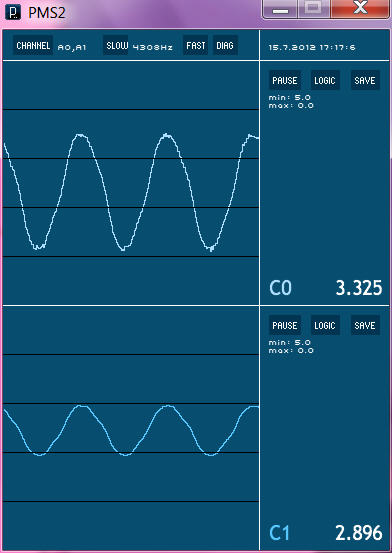
and here the chipKIT MAX32 with 200kHz ( one channel )

For the samples i used the maximum what was possible with UNO,
a integer array of 400 ( 2 columns ) ( 420 did not run )
and so is the new size of the scope.
for MAX32 it could be increased.
new ZIP includes also manual...