
ARDUINO PROJECT: USB TERMINAL MENU
22 ARDUINO PROJECT: USB TERMINAL MENU
to control the program in the arduino
you can send something via USB.
but here a bigger approach what is more as a command input,
- a menu system ( to call the menu ( menu help text ) press [space][enter] in terminal input window )
but if you remember the menu key not need to ask for above helptext, just type the number or letter
with 9 prepared ( character 1 .. 9 ) ( with 0 is switch of all tasks )
- menu entries for start stop
- conti loop structure with timing time slice tasking
and some prepared utilities
add there is tools for USB input of
-strings
-integers
-real
setpoints with example
AND now also a read of CSV lines, split to a array, and convert to number ( depending on type )
fighting for each byte in SRAM ( 2KB in AVR ATMEGA 328p )
i made a revision for USB MENU , where menu texts and diag msgs are in FLASH
add a setpoint input ( long integer ) to enable a conti timer job use setpoint in millis,
with this timer above 30 sec are possible.
pls see example JOB 1 ( start by select "1" , input setpoint "60000", get time every minute , stop by "0")
here revision 2.3
now detects more boards,
examples for counter timed jobs ( load dependent but fast ) and timer dependent jobs
how it looks?
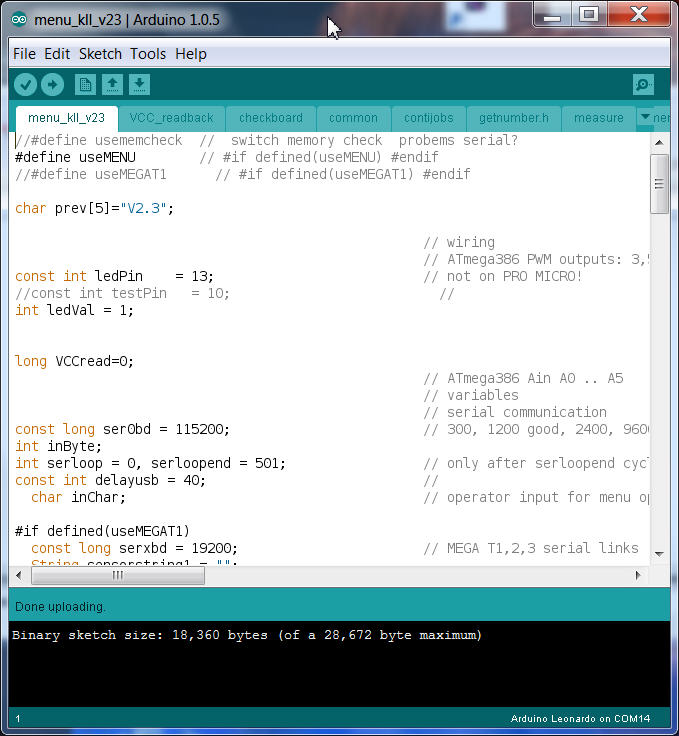 $('#zoom_01').elevateZoom();
  $('#zoom_02').elevateZoom();
  $('#zoom_03').elevateZoom();
  $('#zoom_04').elevateZoom();
 how to use?
lets say you want do a new job,
if it is just a onetime thing use some free characters as menu key
but if you want use the start stop operation and a conti / timed job use a free number.
and as example you want it in menu point 9
-a- in TAB menu about line 40 make a new line for the menu help text
Serial.println(F("9 my new task"));
( this will show up after [space][enter] )
-b- later on same TAB about line 307 is the prepared JOB 9 start stop
after JOB9 on
optionally you can add setpoint or timer inputs... or edit the JOB9 description
-c- in TAB contijobs about line 105
must edit the code what to do. best is to write a procedure in a new own TAB and just call it from there.
-d- basic timer for that job is in line 108 the variable exec9tim
set in main TAB "menu_KLL_v23" line 78 ( as constant )
if you need to make it variable and set it at job start by setpoint entry make it a unsigned long.
about timed jobs see the examples, and notice that there the execXtim is small ( 109 ?)
means only to define when the timecheck has to be performed! ( so this timer get more accurate, but program gets more slow...)
setpoint input:
this menu program has a basic job, that is to look for a input via USB.
and it will accept only the first character and match it with the menuentry list.
when you print the menu help text [space][enter] it is not waiting for a input!!
( as a controller it has better things to do )
but for a setpoint input it must be different,
for this there is a extra "serial wait" program
what has a configurable timeout
and a configurable default ( number) in case its not a good number input
( i use that trick just by answer with [space][enter] again and get the configured default number adjusted )
and that little tool also has a text "question" prepared, but you will notice that i not use it.
i use:
Serial.print(F(" QUESTION (default 1000 ):"));
askquestion("",false,false,30000,true,1000);
because only then i can use the F("") switch to save RAM.
parameter for ASKQUESTION ( see also TAB getnumber.h )
askquestion(question ="? ", showit = true, debug = false, timeout=30000 (30sec), processing for numbers, default number )
if you need to ask for a string: use content of variable inputstring and configure processing numbers FALSE )
when you need a integer... use the varible innum
when you asked for a real number use innum_R
Serial.println(F("set a counter setpoint and start it as a CONTI JOB: MEASURE ")); // question text in ROM
askquestion("",false,false,30000,true,4000); // (notext, noshow, wait max 30sec, make number, default 4000 at bullshit input )
exec2tim = innum; // we need the long int
Serial.println(exec2tim); // to show the result
UPDATE from rev 2.4
there is now a rewrite of the read number tool,
-- detect text (return 0 ) integer ( return 1 ) float ( return 2 )
and a CSV line split is prepared
this is if the menu is operated by a host via USB, where multiple settings have to be sent in one CSV type line. like:
",pointnumber,jobdescription,setpoint1,setpoint2,setpoint3," example see menu C[ENTER]
used already at arduino PID control.
UPDATE from rev 2.5
for diagnostic there is now
-- diagnostic print USB select by compiler switch and enable disable by menu "d" debug variable
UPDATE from rev 2.6
-- diagnostic print I2C to I2C slave ( code included )
UPDATE from rev 2.7
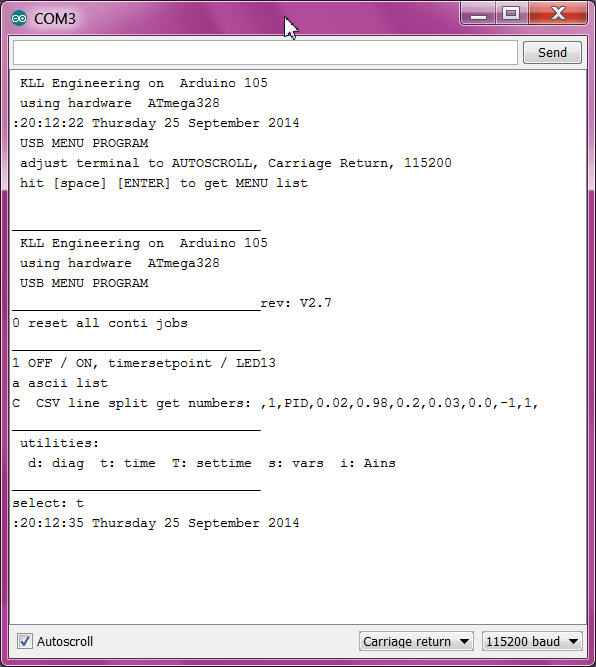
-- integration time lib ( but my own RTC code ) and RTC Real Time Clock hardware DS1307
with menu:
"t" shows System time
"T" writes ( init or update ) RTC and System time ( after battery loss show ERR and must set again )

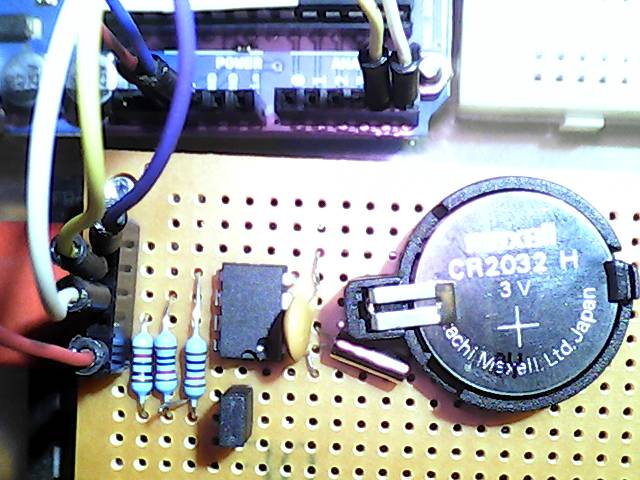

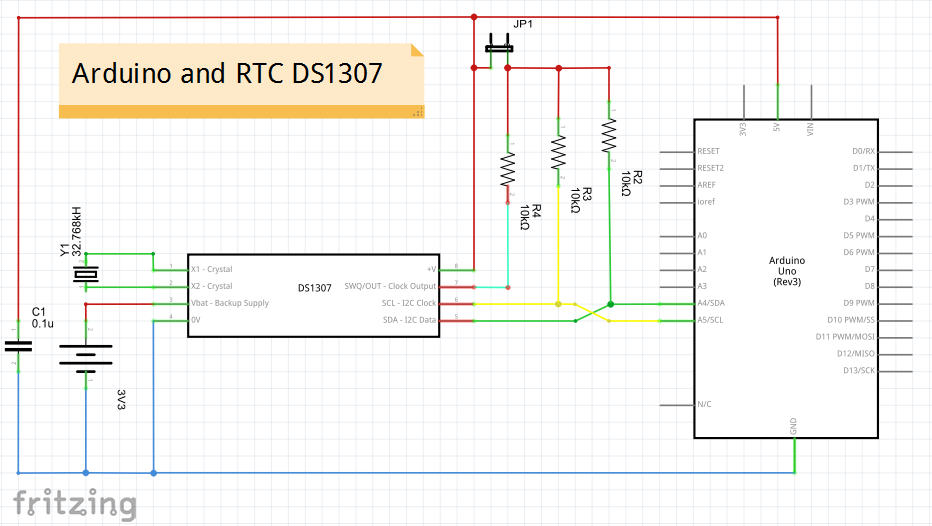
the jumper is between the 3 resistors and 5V, like for RPI must disable the 5V connection.
but its not very clean because still the 3 10k resistors from the 3 data lines are connected together
and coupling the lines by 20k.
 $('#zoom_0x').elevateZoom();
 the Square-Wave-Out not tested until now, but hardware and code exists.
follow up
code