
STM32 BEGINNING
STM32 BEGINNING
start reading about more powerful micro controllers
i got interested in the STM32 world.
I noticed that STMicroelectronics with the discovery boards
starts to be more friendly to beginners...
DID THEY LEARN FROM THE SUCCESS OF ARDUINO??
i wanted to get the STM32F4 DISCOVERY but the shipment costs
to me here in thailand of min 40 USD stopped me.
but i found
at ETteam bangkok
a STM32 Value Line Discovery ( for 470B, 610B incl. VAT and delivery / about 15 EURO )
what is about the STM32F100RBT6B a ARM Cortex-M3 cpu with 128 KB Flash, 8 KB RAM,
( about 4 times bigger arduino uno cpu )
incl. a STM32F103 for the USB interface ST-LINK,
what actually is much ahead the target cpu F100.
( info: at mouser.com its only 9.88 USD (but 40USD shipment)
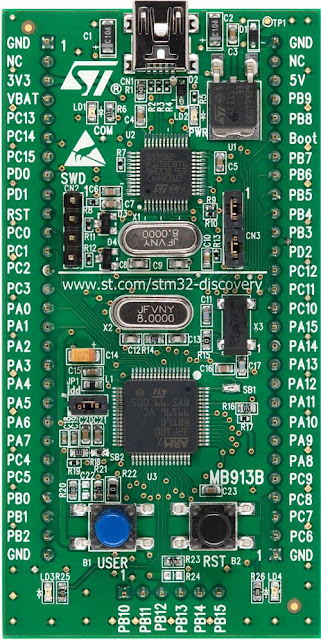
for detailed board circuit.. pls see UM0919
this should anyway only be a first test, to see if i get the development system running.
while the whole study and search i see that in future the new ARDUINO
DUO might be build with this chip family, more reason to learn about this.
____________________________________________________________
( for email order, payment and EMS delivery need 2 days only)
POWER UP
unpack, connect with a USB mini cable
-- red led ( LD2 / PWR ) ON
-- green led ( LD3 ) blinking
++ press USER BUTTON B1 (blue button) gives blue led ( LD4 ) and change blink rate green led ( LD3 )
++ press RESET B2 (black) restart
GPIOC pins 8 and 9 are connected respectively to LD4 and LD3
GPIOA pin 0 is connected to the USER push button
HARDWARE OK
running under WIN 7 PC
parallel to the hardware start, a driver installed
and the board is seen as a usb drive "STM32" ( 31.7MB, but write protected )
containing 3 URL files, link about this board
___________________________________________________________________
well, that was a nice startup
___________________________________________________________________
PROGRAM
now, how to program this board??
from 3 recommended software i selected free TrueSTUDIO-LIGHT
you must register it with a valid email.
why i choose this one? because its not code or time limited, like the others (32k), but it has no C++
german info
with the onboard ST-LINK (SWD only) it seems to be able to program it directly
( jumper CN3 (1-2) (3-4) installed )
or use that ST-LINK to program an other application
( jumper CN3 (1-2) (3-4) removed )
and connect target controller to CN2
1 VDD_TARGET, 2 SWCLK, 3 GND, 4 SWDIO
after install of the
TrueSTUDIO_for_STMicroelectronics_STM32_Lite_win32_v2.3.0_20111221-1049.exe
( 249 MB ) eclipse software ( on win 7 ) i got stuck.
download the AN3268 stm32vldiscovery_package.zip ( 1.6 MB ) with libraries, examples and help and read
UM0987 User manual Developing your STM32VLDISCOVERY application using the Atollic TrueSTUDIO® software
-- extract zip file to a work area path
-- start Truestudio and point to that path
-- import the DISCOVER Project ( what is the factory preload code for easy start )
-- adjust LINKED RESOURCES PATH VARIABLE
( not under FIRMWARE! use ....an3268stm32vldiscovery_package )
-- set the debuging
AND GET A ERROR: CAN NOT CONNECT TO J-LINK
select Project DISCOVER
File / Properties
Run / Debug settings
STM32100B-EVAL.elf EDIT
TAB DEBUGGER change from SEGGER J-LINK to ST-LINK
when DEBUGGER is running LED PWR RED ON, LED COM RED BLINKING
step or with F8 (resume) let in run
___________________________________________________________________
follow the manual to make a new project about button and led and you will see,
you dont have to code one line to have a uploadable functional project.
indeed a easy start.
___________________________________________________________________
now, i see that i am connected by st-link to controller, upload and debug works fine
but can the controller talk to the PC via same USB like i did it with the arduino??
when i connect the board, no com port comes up in device manager,
to connect a terminal software to.
Problem is that target processor is connected by SWD
and not by UART to the USB ST-LINK processor.
anyhow, NOT BAD FOR THE SECOND DAY
____________________________________________________________
play more with the blink example,
learn from systick example how to build delay function
( what a poor software, have and use a interrupt driven timer
and build with it a delay function what keeps the cpu boxed in it )
i must find a better way for blinking, without DELAY.
I am missing all the easy environment / LIBs and HELP .../
from my ARDUINO PLAYGROUND,
or should i feel more professional now?
____________________________________________________________
point is, i noticed that i need more C-language know how, i try this C - Tutorial
____________________________________________________________
using same systick interrupt to make a milliseconds counter
and a seconds counter ( per day ) and a day counter.
and use compare with this counters to create blinking ( seconds) and a 100ms I/O cycle
all now without the delay program.
reading about RTC it looks like its better to wait for the F4 cpu
as usual here the code from the
Atollic TrueSTUDIO® Lite / win
____________________________________________________________
as i learned with ARDUINO, at most code nobody cares about cycle time...
so when i tested cycle time with the STM32F100 / 8MHz crystal / 25MHz /
and button check program i see only
about 8 sec for 1.000.000 loops
( because there is no other way ? or i don't know how to use debug online ?
i reused BLUE LED for toggle ON/OFF each 1.000.000 loops. )
disabling the rest of the program see 1sec.
after put button check.. in a 100msec time slice program i see about 1.5 sec.